

Help Desk: How to access your downloads
1
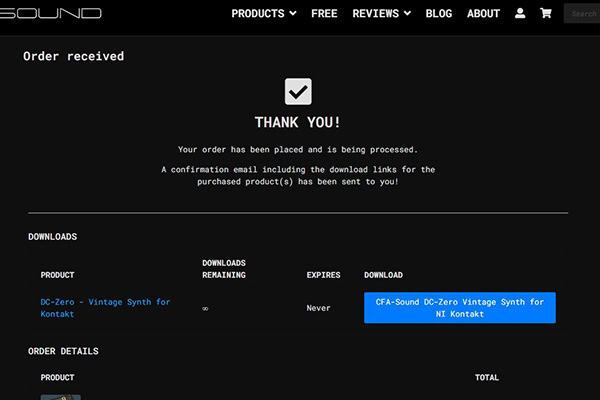
Once you finish the checkout, the website will show you a “Thank You” area, which notices you about the successful order and also directly displays the download of the purchased product.
Additionally, an email with the download link inside the order confirmation will be sent to you.
2
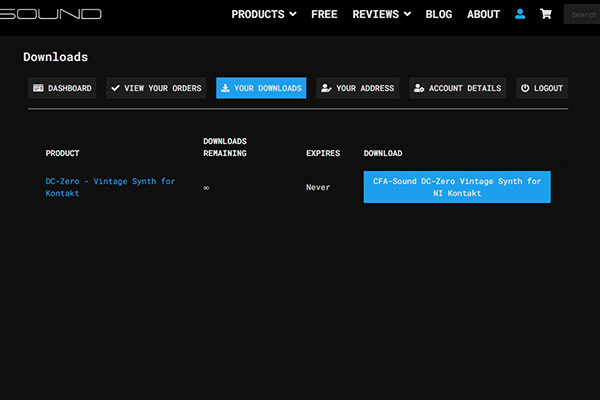
Alternatively, and in case you want to access the downloads later – simply go to “My Account” and click on the tab “Your Downloads”. All downloads from all purchased products will be displayed there. Including additional information like how many downloads will remain.
But this requires, having all purchases done while having a user account. So it`s always highly recommended to create a user account before the first purchase, and of course, to use it for every future purchase.
This can be very practical, in the worst case of e.g. hard drive failure and data loss.
! If you have purchased products, before creating a user account, just use the contact form with your order details and email address used for your user account, and I will manually add them to your user account – so you have all your files in one place!
In most cases our products (e.g. soundsets and presets packs) contain a detailed installation guide, if the presets based on the synthesizer, need to be placed in specific folders and of course, which version of the particular synthesizer is required to use the soundset files. Otherwise, the developer`s synthesizer manual always shows how its preset handling works and can be used.
If you have any questions left or if additional help and support are needed, feel free to contact us via our contact form or via our support forum on KVR.