

This short article shows you, how you can install Serum presets, wavetables, and noise osc samples from 3rd party developers.
And always make sure, you`re running the latest version of Xfer Serum!
1 In order to install Serum presets, wavetables or noise osc samples, you first have to find and open the root folder of Serum itself.
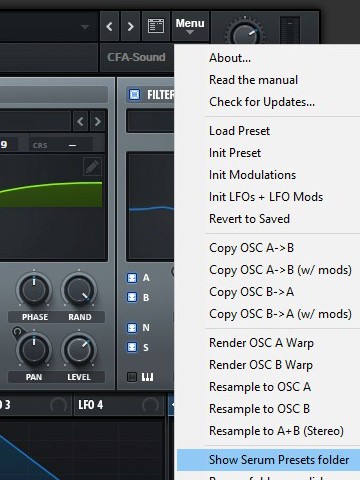
The best way to do this is through the Serum menu: there you just have to click on the menu item “Show Serum Preset folder”.
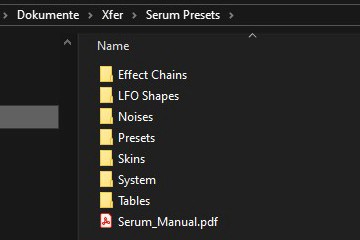
But this folder doesn’t just contain presets, as the name initially suggests. For all sub-types of content, the respective sub-orders for presets, wavetables, and noises (= Noise Osc samples) are collected there.
The structure is self-explanatory, if you only have one folder of presets from a 3rd party preset collection, it is enough to copy this folder into the preset sub-folder. The same applies to all other content types.
However, you should never delete the files from the factory if you want to reorganize the presets, wavetables, etc.
2 Now you can go through the opened content folder of serum, and place the files you want to install in the specific folders. Optionally you can also place them into the “User”-folder, which each sub-folder contains, if you want to keep it simple.
For a clean layout and order, I personally recommend adding all new preset collections with specific folders for them.
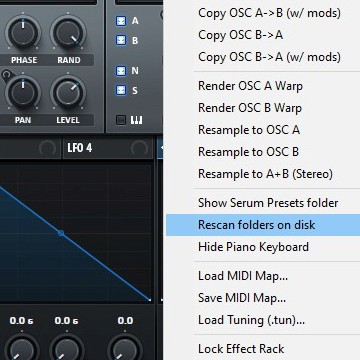
3 Once you have placed all the needed files for the soundsets you wanted to add, simply access the menu of Serum, and click on “Rescan folders on disk” – afterward all the new files, presets, wavetables, etc should be accessible via the preset browser and of course the menus of the oscillators for selecting the new wavetables and noise osc samples.
That`s it, a very comfortable way to install Serum presets, wavetables, and samples.
In most cases our products (e.g. soundsets and presets packs) contain a detailed installation guide, if the presets based on the synthesizer, need to be placed in specific folders and of course, which version of the particular synthesizer is required to use the soundset files. Otherwise, the developer`s synthesizer manual always shows how its preset handling works and can be used.
If you have any questions left or if additional help and support are needed, feel free to contact us via our contact form or via our support forum on KVR.